

What Happened When I Let AI Help Grade a Project
A real classroom experiment turned an AI-assisted process into pages of personalized guidance for every student


By blending recorded comments with AI tools, educators can give timely, meaningful feedback at a scale that once felt impossible.
ChatGPT Prompt: A surreal, conceptual digital illustration of a light-skinned male teacher with short hair and blue glasses, speaking into a modern podcast-style microphone. Beside him, a sleek, ultra-modern laptop emits glowing data streams. Golden sound waves and geometric digital patterns flow from both the microphone and laptop, merging into a radiant stream that connects with a silhouetted student holding a glowing document or tablet. The background is a rich blend of muted blues and deep shadows, contrasted with warm golden highlights. The atmosphere is ethereal, with high contrast lighting and abstract symbols like data points, lines, and squares representing information transfer. The style is modern, dreamlike, and emotionally resonant, emphasizing the partnership between human insight and AI in education.
By Mica T. Mulloy, M.Ed
I’m convinced that creating immediate student feedback is one way that well-structured, well-supervised Artificial Intelligence can make a huge impact in education.
Good teachers know that feedback, in particular formative feedback on projects and writing, is essential for students to grow as learners. One often-cited study reports that “Feedback is among the most critical influences on student learning” (Hattie & Timperley, 2007). Teachers also know that good feedback can take a VERY long time to create. Grading is often the thing teachers spend the most time doing—and it isn’t because it is so much fun.
Long before AI and large language models, researchers found that feedback is most beneficial when two things are true. First, teachers’ comments are not just short, generic statements or circles on a rubric, but they are detailed and specific to the student and how he or she can move forward (Hattie & Timperley, 2007). And second, formative feedback is “timely,” meaning returned to the student within a timeframe that it can be applied to progress on that assignment or at least the next scaffolded assignment (Shute, 2008).
Specific to each student, detailed about his or her work, and returned in a time that allows it to positively impact students’ understanding, which most teachers know could be as little as a few days. This is virtually an impossible task. Maybe you can pull this off for one big assignment—you dedicate almost every waking hour over the course of a few days to grinding through 100, 125, 150, or more assignments. But that Herculean effort has costs, and just is not sustainable. So feedback usually takes weeks or more instead of days. What else can we do?
AI may be part of the solution we’ve been seeking. AI should never replace a teacher’s voice, only amplify or supplement it. But can teachers lean on AI to assist us with the individualized and timely aspects of student feedback?
Transforming the Feedback Process
When my Mindful AI for Education colleague Dani Kachorsky wrote about using AI to transcribe and organize her own voice-recorded feedback, I knew I needed to try it. I also wanted to add another layer: Use AI to give feedback directly to students in addition to my comments.
I currently teach a high school class called “AI Frontiers.” It’s all project-based, and students can intentionally go in many different directions with their work, so canned comments are not really an option. In one assignment, I asked students to build an AI toolbox. Using their own experimentation and research, they were to find what AI tools could do well, what they couldn’t do so well, and what best practices and ethics should guide their work in my class and beyond. They did this individually, then in groups, combined their efforts into consolidated presentations. I needed to give feedback on all of it.
I opened each group’s finished presentation, opened the Voice Memos app on my computer, and just started talking to the students about what I saw. I talked about what went well, what fell short of expectations, how specifically they could improve, what I was interested in, how their slides looked, what was missing, etc. This wasn’t orderly—I was rambling, usually anywhere from 5-6 minutes per project.
When I was done, I uploaded each audio file to Claude and asked for a transcript. ChatGPT would not take the .m4a audio file from my Mac, but Claude had no problem. Then I pasted the transcript into a custom GPT I built that used the assignment and my syllabus as reference, and asked it to organize the transcript using this prompt:
This is a transcript of audio feedback for [insert names here] for the Building an AI Toolbox group project. Summarize the feedback, organizing it into AI text generation tools, AI image generation tools, AI ethics, and overall and miscellaneous comments. Start with positive feedback. Provide a list of action items that could help work toward mastery. When I mention specific content or a specific slide number, make sure to include that in the feedback. Speak directly to the students in a supportive tone. Do not make up anything that I didn't actually say.
The end result was my voice and my comments, it was just better organized and not a dull, disjointed ramble as I looked through dozens of slides. There wasn’t anything hallucinated or paraphrased to the point of being a new thought. It was all me. I did that for each group and copied and pasted the responses into a Google Doc.
For step two, I built a custom activity in Flint AI, which is a tool our school uses. I fed it the assignment, my syllabus, my rubric, and asked it to give students comprehensive feedback on their work from the individual phase, what they contributed to the group phase, a reflection they wrote about the assignment, and an estimate of where they would fall on our mastery-based rubric. Flint allows teachers (and students) to create activities via an easy chat that does the coding and prompting for you. You tell it what you want or don’t want, and it figures out how to build it. The back end of the tool shows the complexity of all it is thinking through, which you can view here. I spent a fair amount of time testing, redirecting, and fine-tuning the activity until I was comfortable with the direction and guardrails I had in place.
I ran the tool and uploaded each student’s individual work, his group’s work, and his individual reflection on the entire project (I teach at an all-boys high school, which is why I keep saying “his” and not “hers”). Flint then dutifully analyzed each part of it against the assignment and the rubric, and spit out feedback for each student, including a grading estimate. I copied that and pasted it into a document. I read it all and agreed with almost all of it. It did not make anything up. In a few cases, it gave seemingly negative feedback about parts of the assignment I did not want to be included in the final assessment. In a couple of cases of students who honestly reflected that they used AI for 75 or 80% of the project (which was allowed—it is an AI class. I just wanted students to be transparent about what they did), it dinged them for not taking more ownership and balancing out the AI vs. Human work. In those cases, I put a strikethrough over the text and then told students to disregard it.
Student Feedback on Student Feedback
I printed out the AI feedback and my own feedback and handed it to the students. The look on their faces when I handed each of them 4-7 pages of typed, individualized feedback was amazing.
They processed it all, told me they felt like it was accurate, and that the grade estimate was close to what they would give themselves. That was good informal feedback, but I wanted to dig deeper into the experience and gave them a survey.
Here’s what students said:
They generally rated the AI and teacher feedback positively (average scores between 2.08-2.50 on a 1-5 scale where 1 is best).
While students appreciated receiving comprehensive feedback—they said it was significantly more than in other classes—many felt the 4-7 pages was excessive.
Students valued how the feedback helped them reflect on their contributions and suggested improvements, including more structured formats and more concise delivery.
“The feedback helped me reflect on my own contributions by showing me areas where I could improve... it helped me see what wasn't working and gave me a clear direction for how to make my work stronger."
"Compared to other classes and projects I've done, the amount of feedback I got this time—about 4 to 7 pages per person—was a lot more than usual. I normally only get about one page of feedback, if any at all."
“Although 4-7 pages may seem like more feedback than you usually need, when you actually read each page you see that A.I was able to go over every single thing that you did... it was also the most informational."
On the whole, their input and suggestions were enough to keep moving forward.
Version 2.0
For the next assignment, I used the same general process with some changes:
I built a Flint activity to create a transcript from my voice recording (Flint is powered by Claude, so it handled the .m4a files) and then organize my comments in a single shot. This time I asked it to structure it in terms of Strengths, Opportunities for Improvement, Missing Elements, Recommendations, and Overall Feedback, and to cap it at 400 words. You can view the Flint system prompts here.
I built a separate Flint activity for AI feedback on the students’ work, asked it to format comments in a similar style, and also capped it at 400 words.
This time around, each student received a combined 3-4 pages of feedback from me and AI, which was right in the sweet spot they recommended. Each part was better organized, as students suggested.
In both of these assignments, I wanted to be the one inputting student work into the activity so I could keep a close eye on the AI feedback. Now that I am comfortable with the process and the results, the AI feedback via Flint will be something students do on their own after they turn the assignment in. I’ll be able to see each student's chat with the activity and the results, and Flint will also tell me what the class collectively did well, what they struggled with, and what my next steps should be.
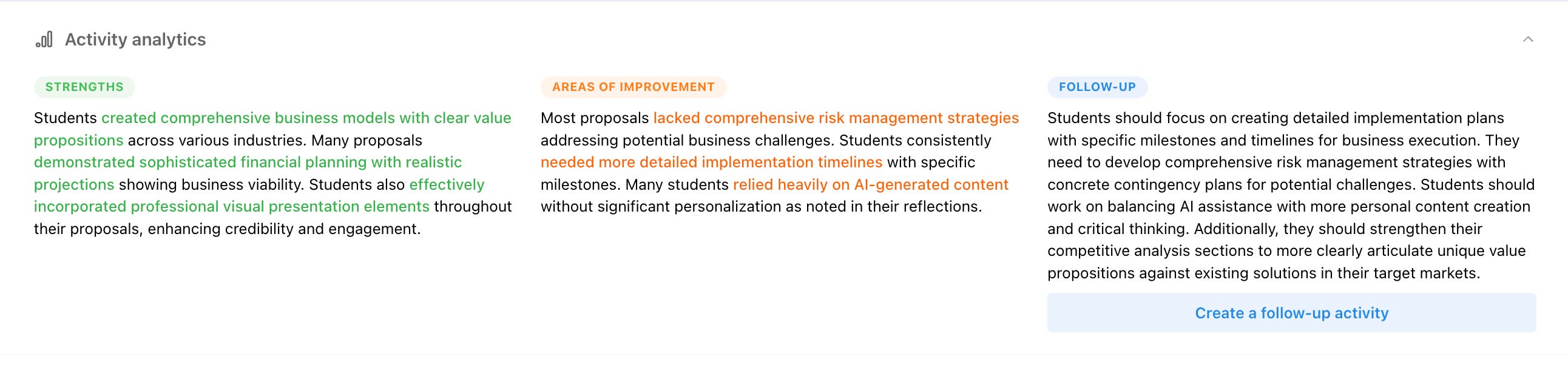
Flint AI activities create a list of strengths, areas of improvement, and follow-ups based on student submissions. The green and orange text are hyperlinks to examples in individual chats.
I did not do a separate survey for the second round of feedback, but my students took an end-of-semester student perception survey for my entire course. They gave me high marks for feedback, and multiple students talked about the quality and volume of feedback in positive terms in their subjective responses about what went well.
Ultimately, I don’t know that this saved me any time. It still took me hours to comment on each assignment, process my recordings, and run their assignments through the AI tool. But in the same amount I would have dedicated to this in the past, students got so much more individualized feedback than I ever would have generated on my own. Now that I am comfortable with turning the initial AI feedback over to students with Flint’s guardrails, they will get that personalized and detailed feedback not just within a few days, but within a few minutes.
If that doesn’t qualify as “timely,” then I don’t know what does.
References
Hattie, J., & Timperley, H. (2007). The Power of Feedback. Review of Educational Research, 77(1), 81-112. https://doi.org/10.3102/003465430298487 (Original work published 2007)
Shute, V. J. (2008). Focus on Formative Feedback. Review of Educational Research, 78(1), 153-189. https://doi.org/10.3102/0034654307313795 (Original work published 2008)